SOME/IP Server Demo
There is an example implementation of SOME/IP server demo available in apps folder. SOME/IP server is in waiting condition for UDP socket connection .Once connected SOME/IP server is ready to send the response to the client.
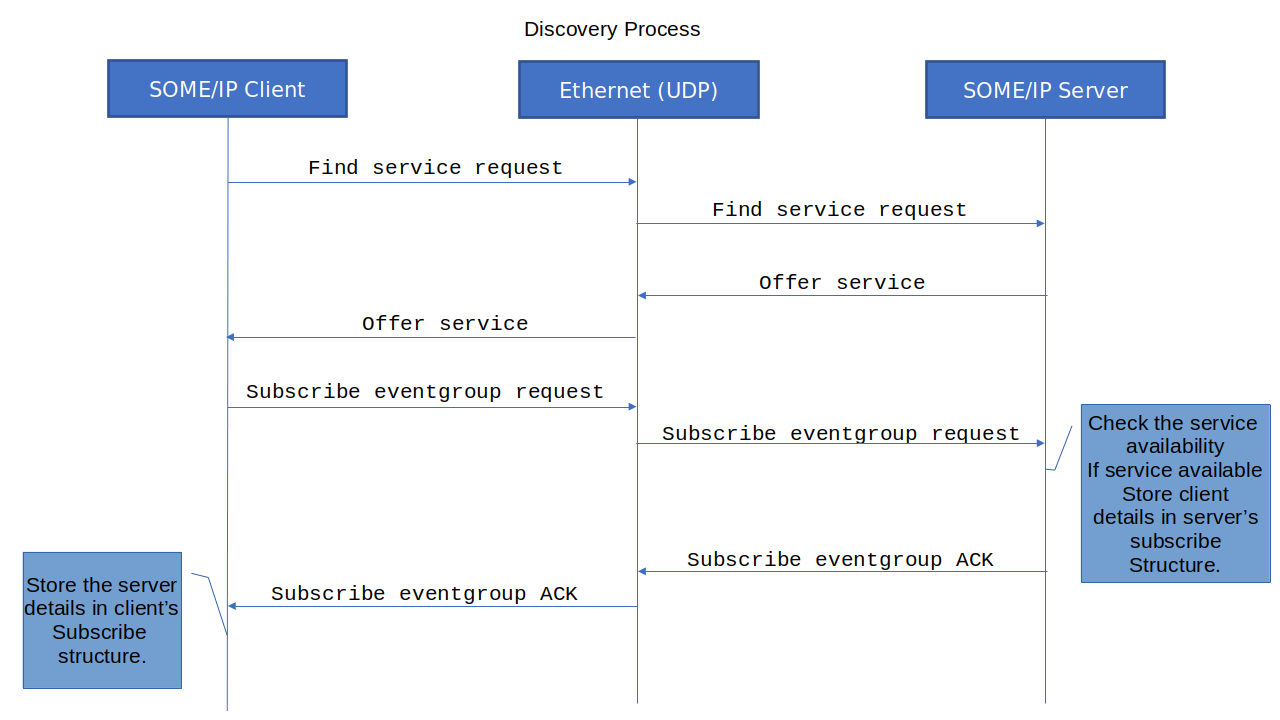
The below diagram captures the high level flow of client and server of SOME/IP.
Service Discovery Process
Notification Process
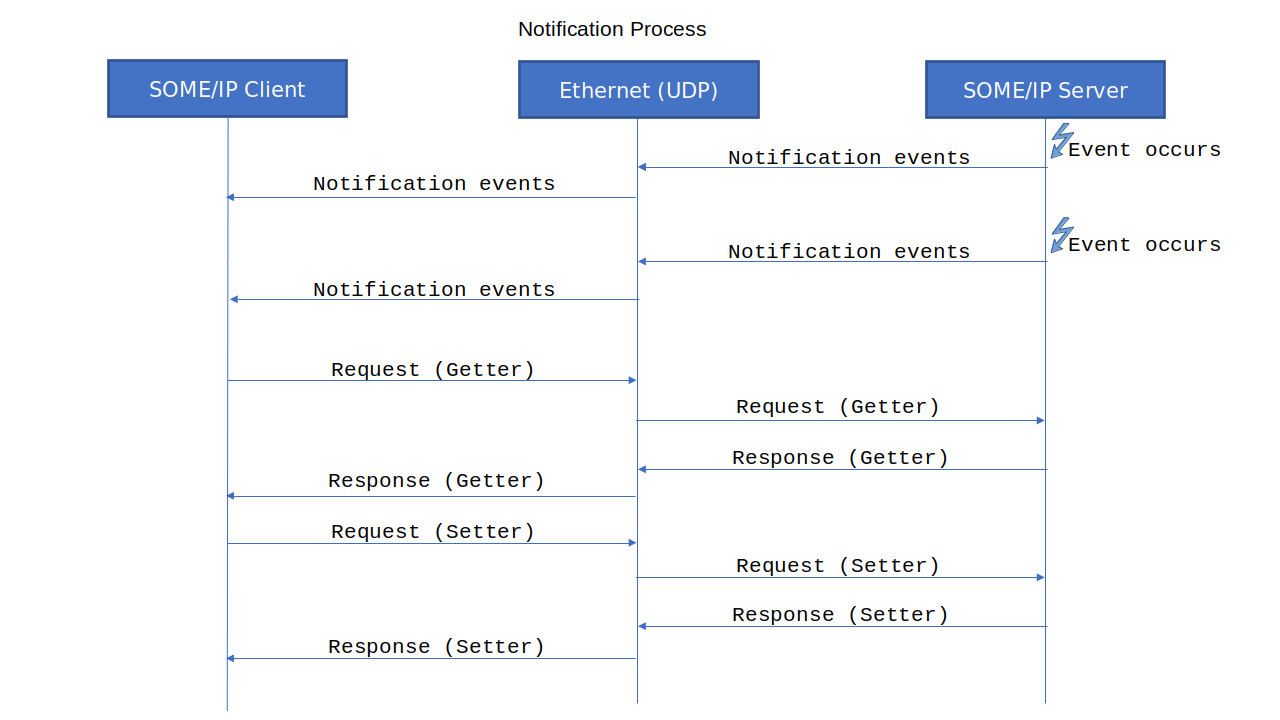
In this implementation, a model ECU is created to mimic various features that hold vehicle information like speed, RPM, door state, and gear state. Based on the SOME/IP protocol, if any event group is subscribed to by a client, the notification events will be sent while fields are updated in the corresponding event group, and data will be read and written on particular events(under subscribed eventgroup) with the below-mentioned event IDs.
Service ID |
Instance ID |
Eventgroup ID |
Event ID |
Size |
Read/Write |
Description |
|---|---|---|---|---|---|---|
0x1234 |
0x5678 |
0x4425 |
0x8001 |
1 Byte |
Read Write |
Wheel slip status |
0x1234 |
0x5678 |
0x4425 |
0x8002 |
2 Byte |
Read Write |
Speed data |
0x1234 |
0x5678 |
0x4425 |
0X8003 |
4 Byte |
Read Write |
RPM data |
0x1234 |
0x5678 |
0x4426 |
0x8004 |
1 Byte |
Read Write |
Engine state |
0x1234 |
0x5678 |
0x4426 |
0x8005 |
2 Byte |
Read Write |
Steering data |
0x1234 |
0x5678 |
0x4426 |
0x8006 |
4 Byte |
Read Write |
YAW rate |
0x1234 |
0x5699 |
0x4425 |
0x8007 |
One Dimensional Array |
Read Write |
Peak voltage current |
0x1234 |
0x5699 |
0x4425 |
0x8008 |
One Dimensional Array |
Read Write |
State of charge and state of health |
0x1234 |
0x5699 |
0x4426 |
0x8009 |
Multi Dimensional Array |
Read Write |
Battery heat grid |
0x1235 |
0x5679 |
0x4425 |
0x800A |
One Dimensional Array |
Read Write |
OTA status message |
0x1235 |
0x5679 |
0x4425 |
0x800B |
One Dimensional Array |
Read Write |
OTA error message |
0x1234 |
0x5678 |
0x4425 |
0x800C |
structure |
Read Write |
Vehicle position event |
0x1235 |
0x5678 |
0x4425 |
0x800D |
structure(union) |
Read Write |
diag_payload_data_1 |
0x1235 |
0x5678 |
0x4425 |
0x800E |
structure(union) |
Read Write |
diag_payload_data_2 |
0x1001 |
0x2001 |
0x4422 |
0x800F |
1 Byte |
Read Write |
Front right door state event |
0x1001 |
0x2002 |
0x4423 |
0x8010 |
1 Byte |
Read Write |
Front left door state event |
0x1001 |
0x2003 |
0x4424 |
0x8011 |
1 Byte |
Read Write |
Rear right door state event |
0x1001 |
0x2004 |
0x4425 |
0x8012 |
1 Byte |
Read Write |
Rear left door state event |
0x1002 |
0x2005 |
0x4427 |
0x8013 |
Structure |
Read Write |
Front right tyre state |
0x1002 |
0x2005 |
0x4427 |
0x8014 |
Structure |
Read Write |
Front left tyre state |
0x1002 |
0x2005 |
0x4428 |
0x8015 |
Structure |
Read Write |
Rear right tyre state |
0x1002 |
0x2005 |
0x4428 |
0x8016 |
Structure |
Read Write |
Rear left tyre state |
0x1003 |
0x2006 |
0x4425 |
0x8017 |
2 Bytes |
Read Write |
ambient light state |
0x1004 |
0x2007 |
0x4425 |
0x8018 |
Structure |
Read Write |
Brake pedal state |
0x1005 |
0x2008 |
0x4430 |
0x8019 |
1 Byte |
Read Write |
Fuel level monitor state |
0x1006 |
0x2009 |
0x4425 |
0x8020 |
One Dimensional Array |
Read Write |
Rain sensor state |
0x1007 |
0x2010 |
0x4431 |
0x8021 |
Structure |
Read Write |
AC monitor event |
Server Service Details Information
Service ID |
Instance ID |
TTL |
Major Ver |
Minor Ver |
Port |
IP Ver |
Proto Type |
|---|---|---|---|---|---|---|---|
0x1234 |
0x5678 |
15 |
1 |
0 |
30510 |
IPV4/IPV6 |
UDP |
0x1234 |
0x5699 |
20 |
2 |
5 |
30511 |
IPV4/IPV6 |
UDP |
0x1235 |
0x5679 |
30 |
1 |
5 |
30510 |
IPV4/IPV6 |
UDP |
0x1234 |
0x5678 |
45 |
4 |
4 |
30510 |
IPV4/IPV6 |
TCP |
0x1235 |
0x5678 |
15 |
1 |
2 |
30512 |
IPV4/IPV6 |
TCP |
0x1001 |
0x2001 |
25 |
1 |
0 |
30500 |
IPV4/IPV6 |
UDP |
0x1001 |
0x2002 |
10 |
1 |
1 |
30501 |
IPV4/IPV6 |
UDP |
0x1001 |
0x2003 |
15 |
1 |
2 |
30502 |
IPV4/IPV6 |
UDP |
0x1001 |
0x2004 |
20 |
1 |
3 |
30503 |
IPV4/IPV6 |
UDP |
0x1002 |
0x2005 |
15 |
1 |
0 |
30504 |
IPV4/IPV6 |
TCP |
0x1003 |
0x2006 |
20 |
1 |
0 |
30510 |
IPV4/IPV6 |
UDP |
0x1004 |
0x2007 |
25 |
1 |
0 |
30510 |
IPV4/IPV6 |
UDP |
0x1005 |
0x2008 |
30 |
1 |
0 |
30507 |
IPV4/IPV6 |
TCP |
0x1006 |
0x2009 |
20 |
1 |
0 |
30510 |
IPV4/IPV6 |
UDP |
0x1007 |
0x2010 |
25 |
1 |
0 |
30510 |
IPV4/IPV6 |
TCP |
Server Eventgroup Details Information
Service ID |
Instance ID |
Eventgroup |
Multicast Port |
Multicast IPV4 Addr |
Multicast IPV6 Addr |
|---|---|---|---|---|---|
0x1234 |
0x5678 |
0x4425 |
35689 |
“224.0.10.5” |
“FF05:0000:0000:0000:0000:0000:1235:1236” |
0x1234 |
0x5678 |
0x4426 |
35333 |
“224.3.3.3” |
“FF05:0000:0000:0000:1237:0000:8000:3000” |
0x1234 |
0x5699 |
0x4425 |
35670 |
“224.25.36.15” |
“FF05:0000:0000:0000:1237:0000:7777:5000” |
0x1234 |
0x5699 |
0x4426 |
35690-IPV6 and 35689-IPV4 |
“224.0.10.5” |
“FF05:0000:0000:0000:1237:0000:8000:2000” |
0x1235 |
0x5679 |
0x4425 |
35333 |
“224.3.3.3” |
“FF05:0000:0000:0000:1237:0000:8000:3000” |
0x1234 |
0x5678 |
0x4425 |
0 |
0 |
0 |
0x1235 |
0x5678 |
0x4425 |
0 |
0 |
0 |
0x1001 |
0x2001 |
0x4422 |
35444 |
“224.4.4.4” |
“FF05:0000:0000:0000:1237:0000:8000:4000” |
0x1001 |
0x2002 |
0x4423 |
35444 |
“224.4.4.4” |
“FF05:0000:0000:0000:1237:0000:8000:4000” |
0x1001 |
0x2003 |
0x4424 |
35444 |
“224.4.4.4” |
“FF05:0000:0000:0000:1237:0000:8000:4000” |
0x1001 |
0x2004 |
0x4425 |
35444 |
“224.4.4.4” |
“FF05:0000:0000:0000:1237:0000:8000:4000” |
0x1002 |
0x2005 |
0x4427 |
0 |
0 |
0 |
0x1002 |
0x2005 |
0x4428 |
0 |
0 |
0 |
0x1003 |
0x2006 |
0x4425 |
35690 - IPV6 and 35670 - IPV4 |
“224.25.36.15” |
“FF05:0000:0000:0000:1237:0000:8000:2000” |
0x1004 |
0x2007 |
0x4425 |
35690 - IPV6 and 35670 - IPV4 |
“224.25.36.15” |
“FF05:0000:0000:0000:1237:0000:8000:2000” |
0x1005 |
0x2008 |
0x4430 |
0 |
0 |
0 |
0x1006 |
0x2009 |
0x4425 |
35444 |
“224.4.4.4” |
“FF05:0000:0000:0000:1237:0000:8000:4000” |
0x1007 |
0x2010 |
0x4431 |
0 |
0 |
0 |
Server Event Information
Service ID |
Instance ID |
Major Version |
Eventgroup ID |
Event ID |
|---|---|---|---|---|
0x1234 |
0x5678 |
1 |
0x4425 |
0x8001 |
0x1234 |
0x5678 |
1 |
0x4425 |
0x8002 |
0x1234 |
0x5678 |
1 |
0x4425 |
0x8003 |
0x1234 |
0x5678 |
1 |
0x4426 |
0x8004 |
0x1234 |
0x5678 |
1 |
0x4426 |
0x8005 |
0x1234 |
0x5678 |
1 |
0x4426 |
0x8006 |
0x1234 |
0x5699 |
2 |
0x4425 |
0x8007 |
0x1234 |
0x5699 |
2 |
0x4425 |
0x8008 |
0x1234 |
0x5699 |
2 |
0x4426 |
0x8009 |
0x1235 |
0x5679 |
1 |
0x4425 |
0x800A |
0x1235 |
0x5679 |
1 |
0x4425 |
0x800B |
0x1234 |
0x5678 |
4 |
0x4425 |
0x800C |
0x1235 |
0x5678 |
1 |
0x4425 |
0x800D |
0x1235 |
0x5678 |
1 |
0x4425 |
0x800E |
0x1001 |
0x2001 |
1 |
0x4422 |
0x800F |
0x1001 |
0x2002 |
1 |
0x4423 |
0x8010 |
0x1001 |
0x2003 |
1 |
0x4424 |
0x8011 |
0x1001 |
0x2004 |
1 |
0x4425 |
0x8012 |
0x1002 |
0x2005 |
1 |
0x4427 |
0x8013 |
0x1002 |
0x2005 |
1 |
0x4427 |
0x8014 |
0x1002 |
0x2005 |
1 |
0x4428 |
0x8015 |
0x1002 |
0x2005 |
1 |
0x4428 |
0x8016 |
0x1003 |
0x2006 |
1 |
0x4425 |
0x8017 |
0x1004 |
0x2007 |
1 |
0x4425 |
0x8018 |
0x1005 |
0x2008 |
1 |
0x4430 |
0x8019 |
0x1006 |
0x2009 |
1 |
0x4425 |
0x8020 |
0x1007 |
0x2010 |
1 |
0x4431 |
0x8021 |
Server Event Data Information
Event ID |
User Data Type |
Description |
|---|---|---|
0x8001 |
uint8 |
Wheel Slip Status |
0x8002 |
uint16 |
Speed Data |
0x8003 |
uint32 |
RPM Data |
0x8004 |
int8 |
Engine State |
0x8005 |
int16 |
Steering Data |
0x8006 |
int32 |
Yaw rate |
0x8007 |
One Dimensional Array |
Peak Vol Current |
0x8008 |
One Dimensional Array |
State of charge and state of health |
0x8009 |
Multi Dimensional Array |
Battery Heat Grid |
0x800A |
One Dimensional Array |
ota status message |
0x800B |
One Dimensional Array |
ota error message |
0x800C |
Structure (float …, float .., uint32_t .., uint32_t …) |
Vehicle Pos Event data (latitude, longitude, speed, heading_direction) |
0x800D |
union (uint8_t, uint16_t, uint32_t) |
Diag Payload Data 1 (status_flags, error_type, fault_code) |
0x800E |
union (uint8_t, uint16_t, uint32_t) |
Diag Payload Data 2 (status_flags, error_type, fault_code) |
0x800F |
uint8 |
Front right door state event |
0x8010 |
uint8 |
Front left door state event |
0x8011 |
uint8 |
Rear right door state event |
0x8012 |
uint8 |
Rear left door state event |
0x8013 |
Structure (float) |
Front right tyre state (tyre_temp_c, tyre_pressure_kPa) |
0x8014 |
Structure (float) |
Front left tyre state (tyre_temp_c, tyre_pressure_kPa) |
0x8015 |
Structure (float) |
Rear right tyre state (tyre_temp_c, tyre_pressure_kPa) |
0x8016 |
Structure (float) |
Rear left tyre state (tyre_temp_c, tyre_pressure_kPa) |
0x8017 |
uint16 |
ambient light state |
0x8018 |
Structure (uint8_t.., uint16_t) |
Brake pedal state (pedal_position, pressure_kPa) |
0x8019 |
uint8 |
Fuel level monitor state |
0x8020 |
One Dimensional Array |
Rain sensor state |
0x8021 |
Structure (uint8_t.., int8_t..,) |
AC monitor event (ac_power_state, ac_temperature_set, ac_fan_speed_level, ac_mode) |
Read data by Method ID services:
Event ID |
Method ID |
|---|---|
0x8001 |
101 |
0x8002 |
102 |
0x8003 |
103 |
0x8004 |
104 |
0x8005 |
105 |
0x8006 |
106 |
0x8007 |
107 |
0x8008 |
108 |
0x8009 |
109 |
0x800A |
10A |
0x800B |
10B |
0x800C |
10C |
0x800D |
10D |
0x800E |
10E |
0x800F |
10F |
0x8010 |
110 |
0x8011 |
111 |
0x8012 |
112 |
0x8013 |
113 |
0x8014 |
114 |
0x8015 |
115 |
0x8016 |
116 |
0x8017 |
117 |
0x8018 |
118 |
0x8019 |
119 |
0x8020 |
120 |
0x8021 |
121 |
Write data by Method ID services:
Event ID |
Method ID |
|---|---|
0x8001 |
01 |
0x8002 |
02 |
0x8003 |
03 |
0x8004 |
04 |
0x8005 |
05 |
0x8006 |
06 |
0x8007 |
07 |
0x8008 |
08 |
0x8009 |
09 |
0x800A |
0A |
0x800B |
0B |
0x800C |
0C |
0x800D |
0D |
0x800E |
0E |
0x800F |
0F |
0x8010 |
10 |
0x8011 |
11 |
0x8012 |
12 |
0x8013 |
13 |
0x8014 |
14 |
0x8015 |
15 |
0x8016 |
16 |
0x8017 |
17 |
0x8018 |
18 |
0x8019 |
19 |
0x8020 |
20 |
0x8021 |
21 |
SOME/IP Server Memory Details
The SOME/IP Server Demo Application manages multiple services and client subscriptions using predefined static memory allocations. Each server instance maintains dedicated memory structures for notification handling (via UDP or TCP), service management, and subscriber tracking. These allocations ensure deterministic runtime behavior and predictable performance across varying numbers of connected clients.
The server uses dedicated 5 KB buffers for TX and RX per message context, consistent with the SOME/IP and SOME/IP-TP communication models. This allows efficient transmission of both standard and large payloads without dynamic memory fragmentation.
Configuration / Structure |
Macro / Size |
Description & Impact |
|---|---|---|
|
10 (default) |
Defines the maximum number of UDP sockets used by the server to send notification messages (e.g., event updates).
Each socket instance is stored in |
|
10 (default) |
Specifies the maximum number of TCP sockets used for event notification and data transmission.
Each TCP socket maintains its own protocol context and connection state within |
|
5 (default) |
Defines the maximum number of simultaneous TCP client connections that can be managed by the server. Each active TCP connection consumes a dedicated instance structure and associated socket buffer resources. |
|
Application-defined (e.g., 250) |
Represents the total number of SOME/IP services available on the server. Each service consumes memory for service configuration, instance management, and handler registration. |
|
User Defined Size |
Tracks the current number of active subscribers connected to the server. Used to allocate and manage notification channels (UDP/TCP) for each subscribed client. |
|
~5 KB each |
Dedicated transmit and receive buffers used by the SOME/IP layer. These buffers are aligned with SOME/IP-TP for handling large data transfers that require segmentation and reassembly. |
|
Structure instance |
Holds arrays of UDP and TCP notification socket information used to manage outgoing communication to subscribed clients. |
All macro values (e.g.,
RS_SOMEIP_SERVER_MAX_TCP_CONN,RS_SOMEIP_SERVER_MAX_UDP_SOCKET) are compile-time constants, meaning memory is statically allocated during build time.Increasing these values allows the server to handle more concurrent client connections or offered services, but proportionally increases RAM and stack usage.
Reducing the values may result in connection refusals, missed event notifications, or limited scalability under high client load.
The TX/RX buffer size (5 KB) must remain consistent with the SOME/IP-TP configuration, ensuring proper segmentation and reassembly of large responses or event payloads.
When scaling the server for multiple services or high concurrency, verify that the target platform has adequate heap and static memory to handle the increased number of connections and message buffers.
SOME/IP Server Running Example
Refer to the Supported Platforms page to setup your environmental setup and follow further.
User Configuration for Server (IPV4)
Socket configuration |
Value |
|---|---|
SOME/IP Protocol Version |
0 - IPV4 |
SOME/IP server IP address |
IP address of server running PC or machine |
SOME/IP SD Port |
30490 |
SOME/IP SD message send mode for server. |
0 - Unicast Mode |
SOME/IP Service Discovery Unicast IPV4 Addr(192.168.29.39 or 10.0.0.5) |
192.168.29.93 |
SOME/IP server cyclic offer delay (ms) |
5000 |
SOME/IP server initial delay minimum (ms) |
500 |
SOME/IP server initial delay maximum (ms) |
1000 |
SOME/IP server repetition base delay (ms) |
200 |
SOME/IP server repetitions maximum |
5 |
SOME/IP server NPDU TX timeout (ms) |
500 |
SOME/IP server log level in hex without(0x) |
1 |
SOME/IP server simulation run for cyclic event update |
|
SOME/IP server simulation run for 250 services |
|
SOME/IP server set state for all services |
|
SOME/IP-TP RX Timeout (ms) |
2000 |
SOME/IP-TP TX separation time (ms) |
10 |
SOME/IP-TP burst size |
1 |
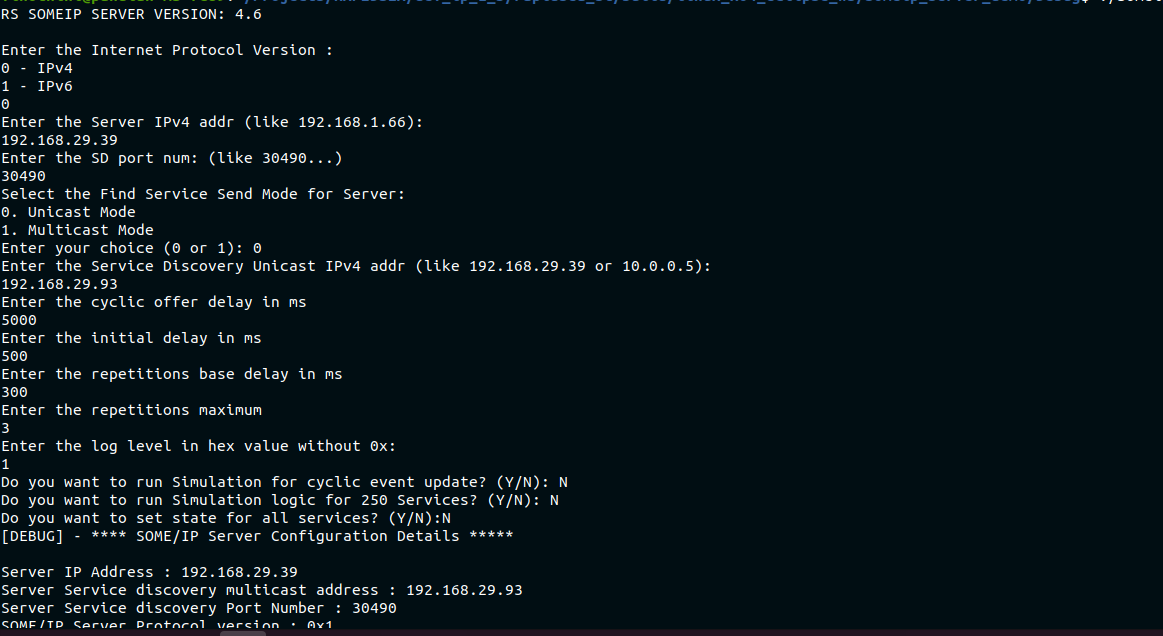
After project successfully built, someip_server_demo binary generated.
Open the terminal in the above folder and run the below command
(IPV4)

User Configuration for Server (IPV6)
Socket configuration |
Value |
|---|---|
SOME/IP Protocol Version |
1 - IPV6 |
SOME/IP server IP address |
IP address of server running PC or machine |
SOME/IP SD Port |
30490 |
SOME/IP server Port number |
30509 |
SOME/IP Service Discovery Unicast IPV6 Addr(2001:db8::1 or fe80::1a2b:3c4d:5e6f:7a8b) |
2405:201:e066:b809:bd4b:6245:8cb1:228d |
SOME/IP server cyclic offer delay (ms) |
5000 |
SOME/IP server initial delay (ms) |
500 |
SOME/IP server repetition base delay (ms) |
200 |
SOME/IP server repetitions maximum |
5 |
SOME/IP server log level in hex without(0x) |
1 |
SOME/IP serer run for cyclic event update |
|
SOME/IP-TP RX Timeout (ms) |
2000 |
SOME/IP-TP TX separation time (ms) |
10 |
SOME/IP-TP burst size |
1 |
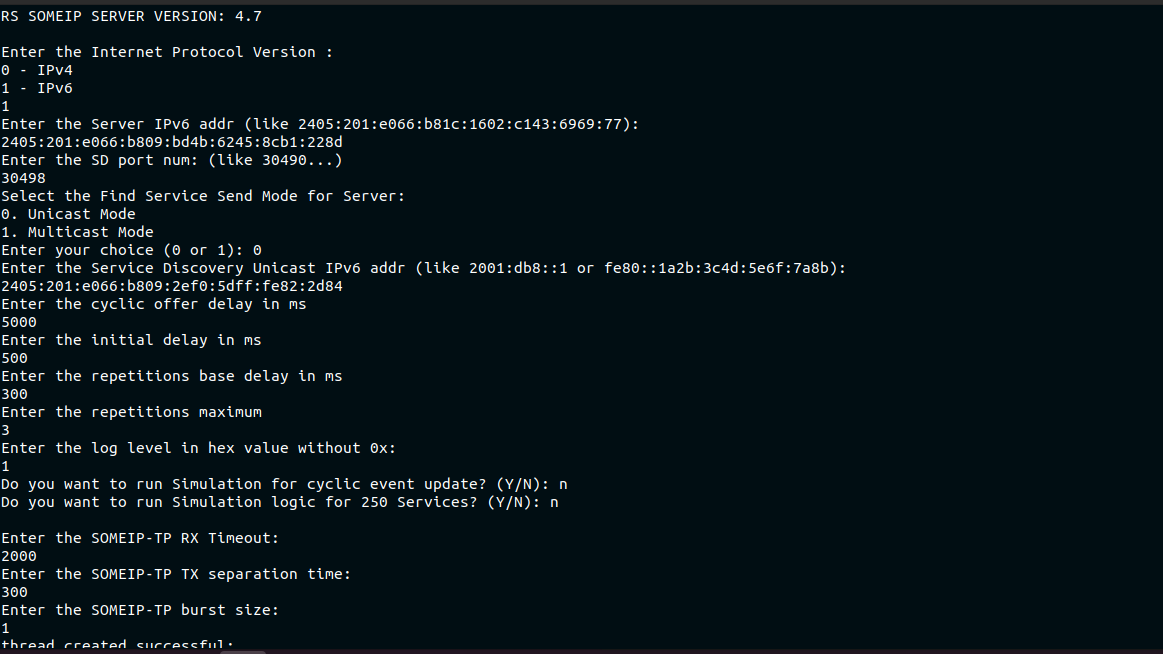
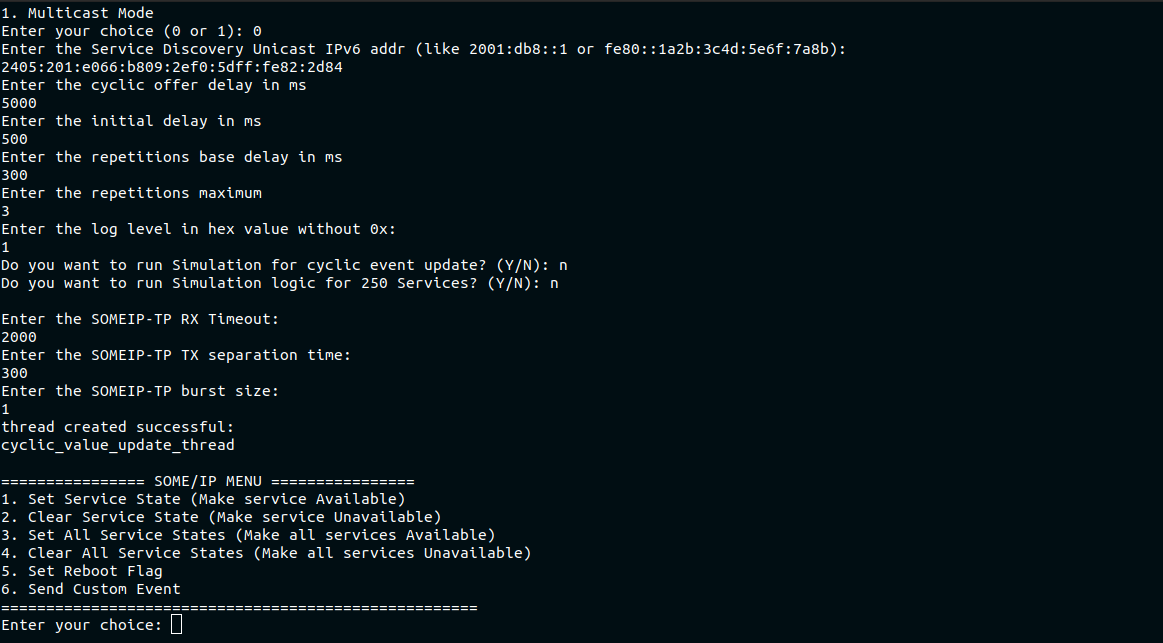
Note: The log level uses individual bits to enable or disable specific log categories. Each log type corresponds to a bit position (RS_LOG_ERR → bit 0, RS_LOG_INFO → bit 1, RS_LOG_DEBUG → bit 2, RS_LOG_RX → bit 3, RS_LOG_TX → bit 4).
For example, log level = 1D (binary 11101) means that the 0th, 2nd, 3rd, and 4th bits are set, so ERR, DEBUG, RX, and TX logs are enabled, while the INFO log (bit 1) is disabled.
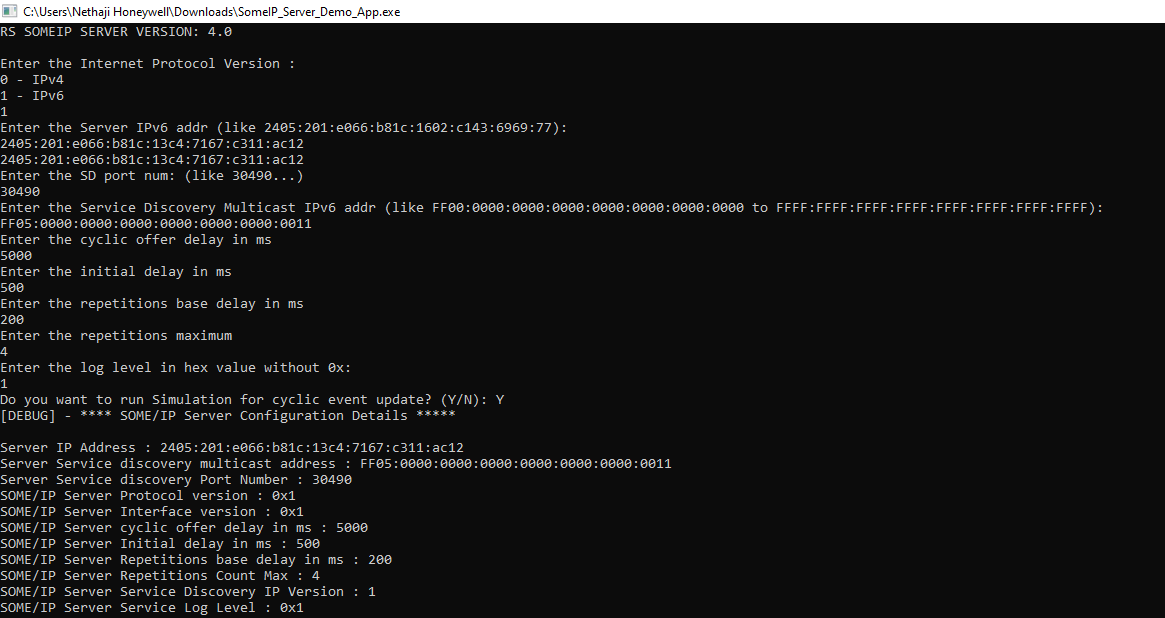
After project successfully built, someip_server_demo binary generated.
Open the terminal in the above folder and run the below command
(IPV6)
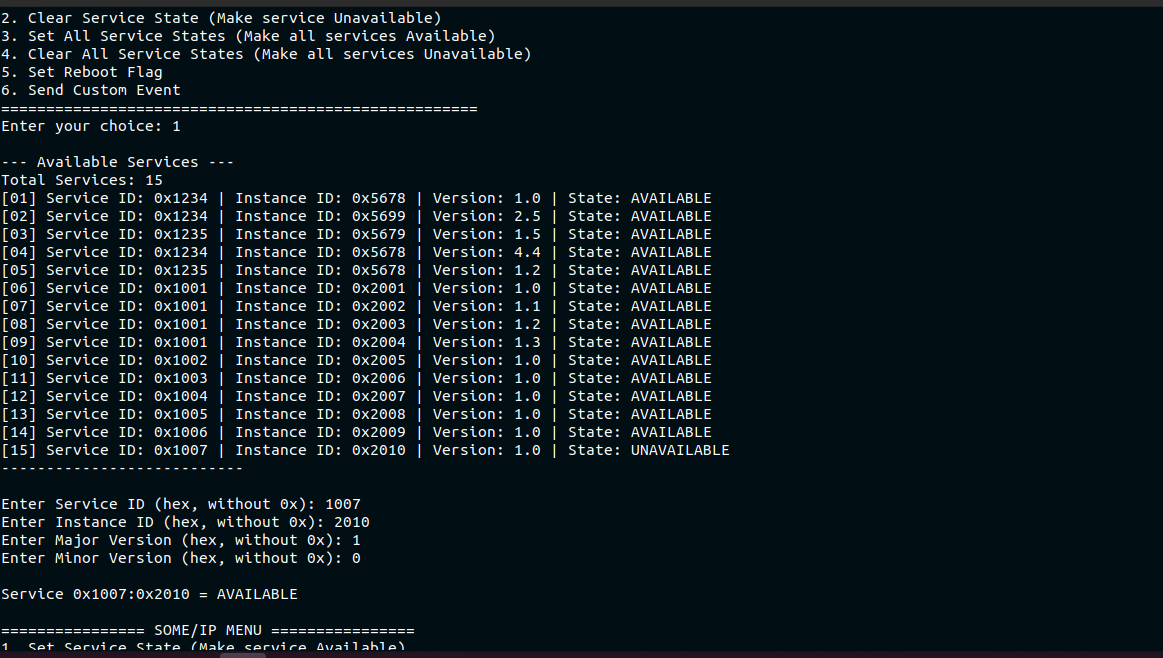
Set Service State
To make a specific service Available on the SOME/IP Server, choose the option Set Service State.
Type 1 and press Enter.
Enter the Service ID, Instance ID, Major Version, and Minor Version in hexadecimal format.
The selected service is set to AVAILABLE and advertised through Service Discovery (SD).
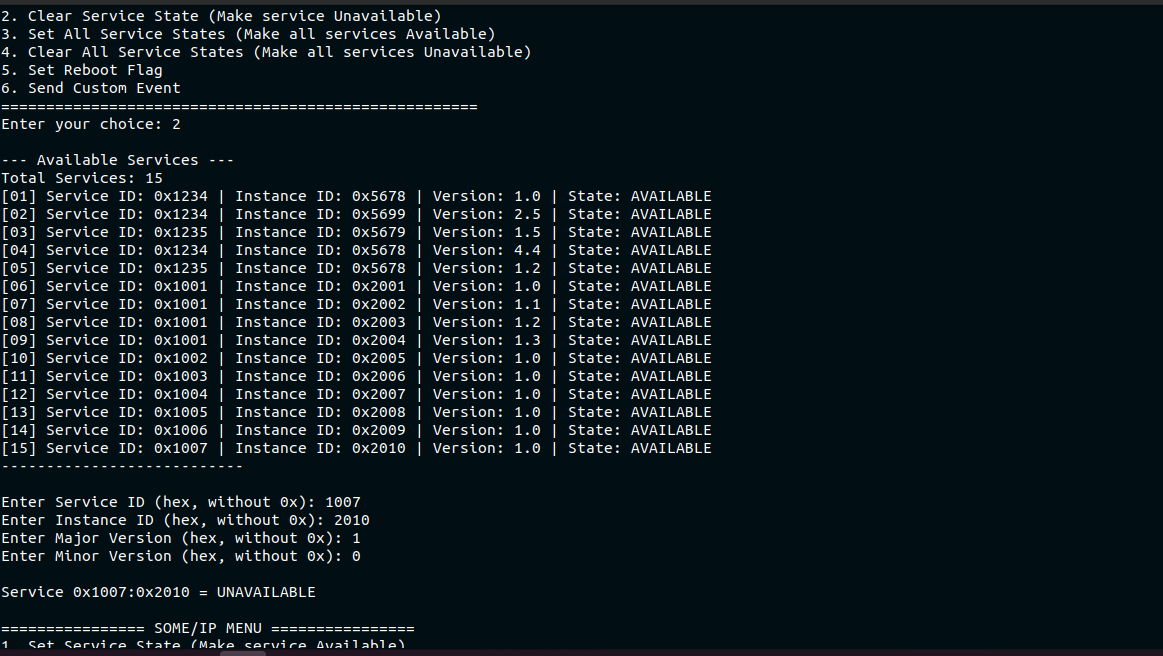
Clear Service State
To deactivate a specific service, choose Clear Service State.
Type 2 and press Enter.
Enter the Service ID, Instance ID, Major Version, and Minor Version in hexadecimal format.
The selected service is set to UNAVAILABLE, and a Stop Offer message is sent through SD.
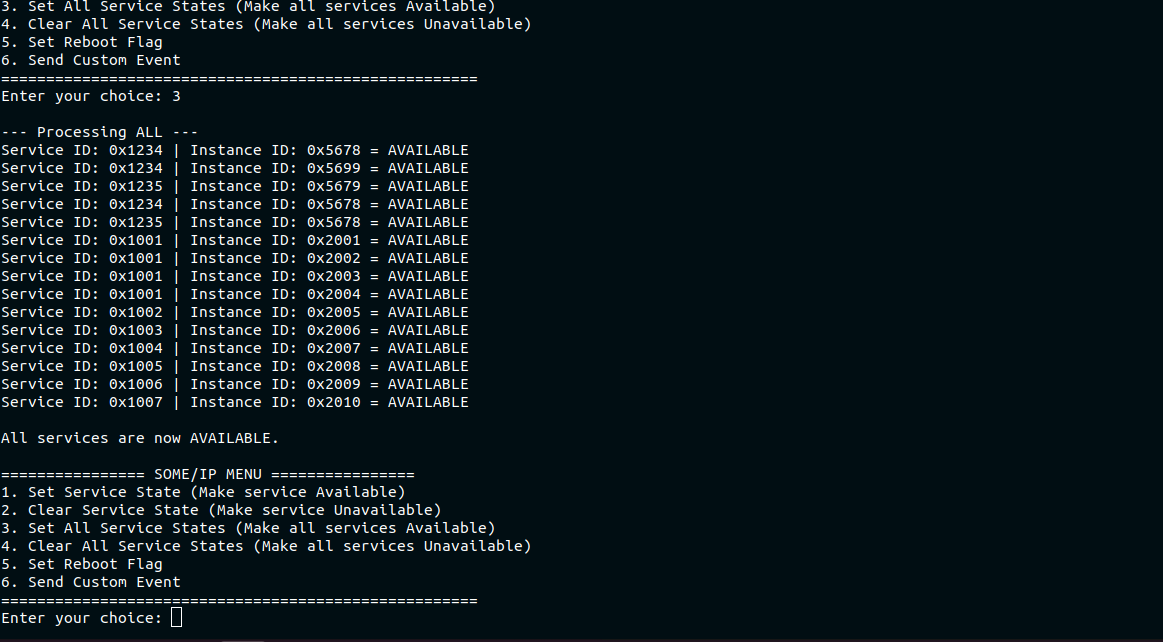
Set All Service States
To make all configured services Available at once, choose Set All Service States.
Type 3 and press Enter.
The client sets all services in the service table to AVAILABLE and announces them via SD cyclic offers.
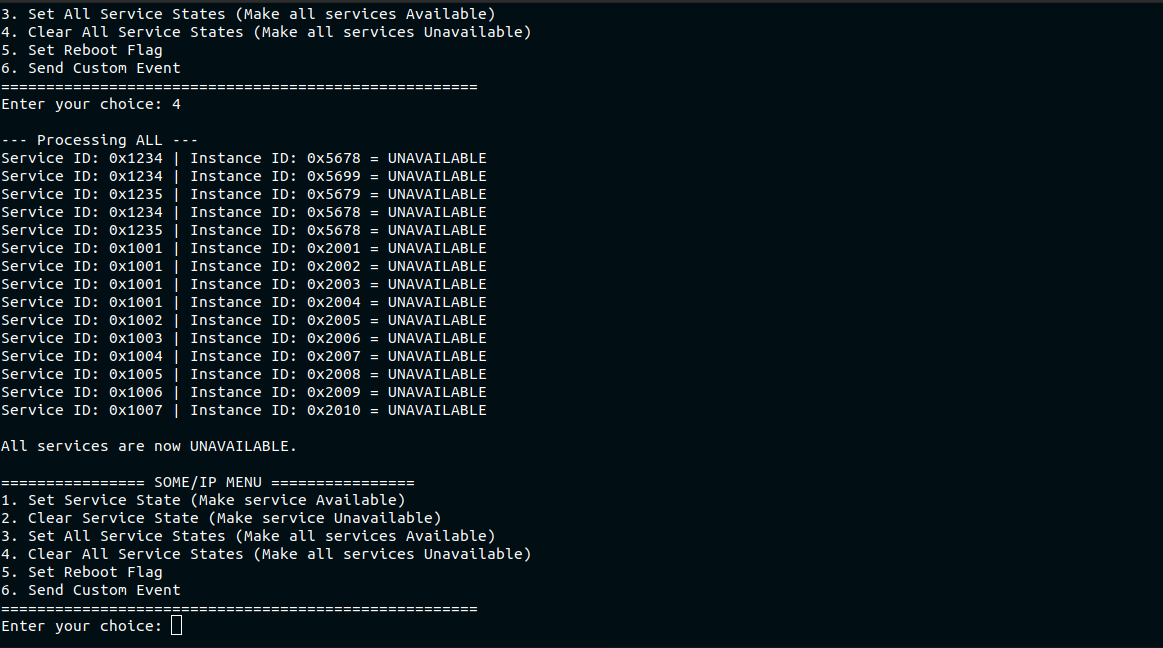
Clear All Service States
To make all configured services Unavailable, choose Clear All Service States.
Type 4 and press Enter.
All services are cleared and marked as UNAVAILABLE in the service table.
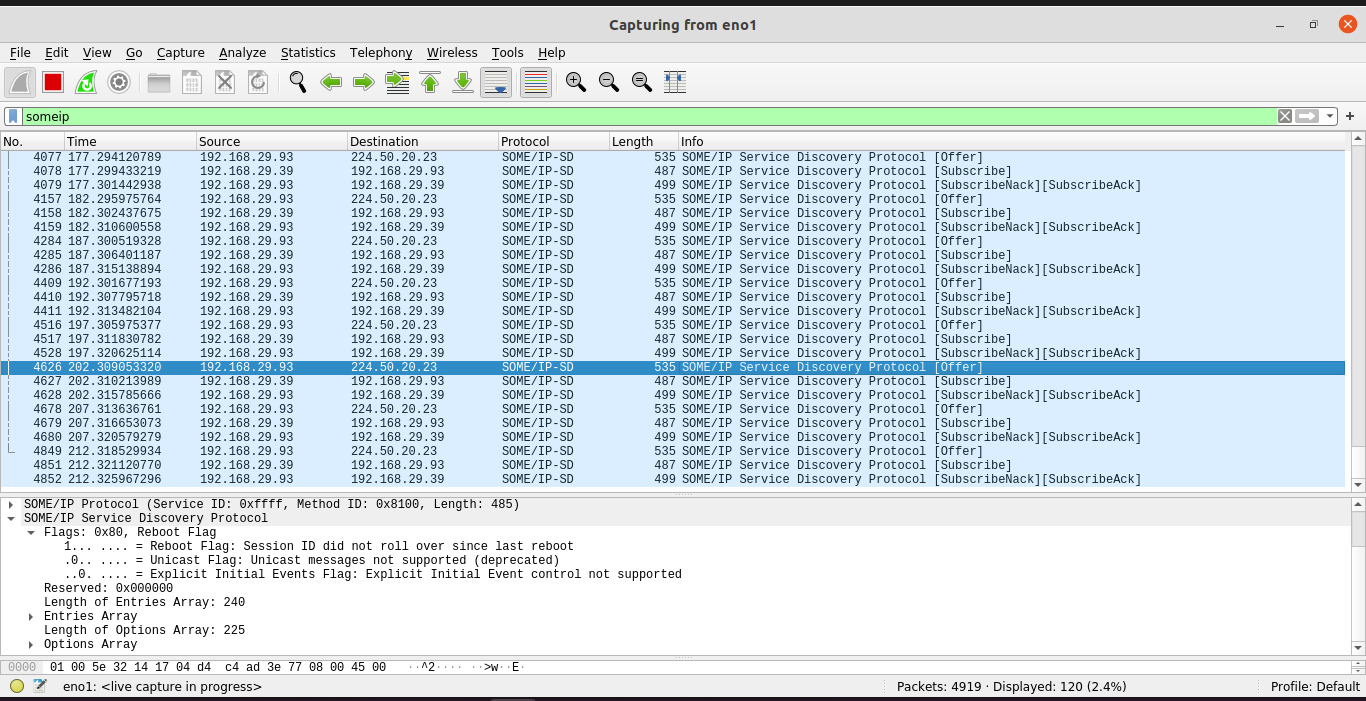
Set Reboot Flag
To simulate a Service or ECU reboot, choose Set Reboot Flag.
Type 5 and press Enter.
The client sets a reboot flag, forcing the server to resend service offers and restart advertisements.
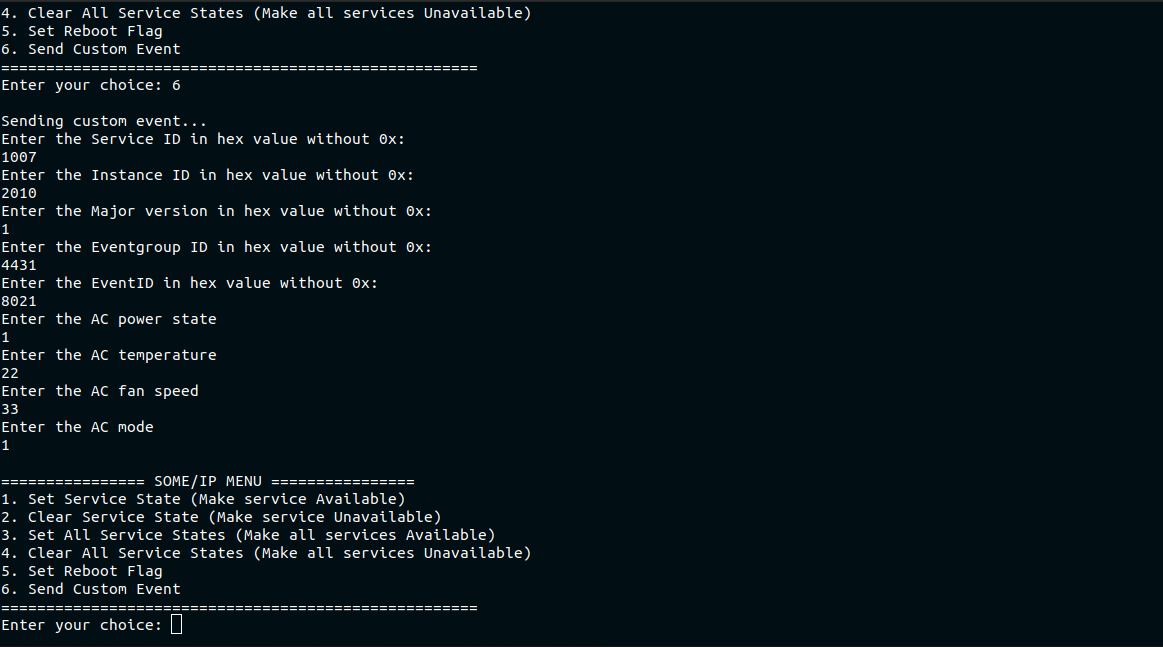
Send Custom Event
To send a manual SOME/IP Event Notification, choose Send Custom Event.
Type 6 and press Enter.
Enter the Service ID, Event Group ID, Payload Length, and Payload Data (in hex).
The system frames and transmits the event to all subscribed clients.
The SOME/IP server initiates the process and waits for the client to connect. After the SOME/IP client starts the process, both the server and client connects and proceed with services.
Refer to the SOME/IP protocol page for more details SOME/IP Protocol.