Webserver
Webserver Overview
A webserver is a software system that responds to HTTP requests from clients (such as browsers, applications, or devices) and delivers web content such as HTML pages, images, and API responses. Webservers form the backbone of web-based communication and are widely used in applications ranging from embedded systems to cloud services. They are responsible for handling multiple client connections simultaneously, processing requests, and sending back appropriate responses over TCP/IP networks.
RAPIDSEA offers a platform-independent webserver that can run on any system with TCP/IP support. The implementation provides all the core web-server functionalities and is optimized for embedded, desktop, and real-time operating systems.
- Some of the salient features of RAPIDSEA Webserver are:
HTTP/1.0 support for GET, POST, PUT, DELETE requests.
Handles multiple simultaneous client connections.
Lightweight and highly optimized for MCUs and resource-constrained systems.
Configurable buffer sizes and connection timeouts.
Platform independent — runs on Linux, Windows, and RTOS-based systems.
Easy integration via callback APIs for custom webpages.
The implementation is fully configurable, supports both blocking and non-blocking operation modes, and can be integrated seamlessly into a variety of embedded and desktop applications.
Webserver
RAPIDSEA implements a lightweight, platform-independent webserver that allows multiple clients to connect and interact with the system through standard HTTP interfaces.
Application Interface
The below table captures the function that are to be called from the application logic.
Function |
Description |
|---|---|
rs_webserver_open |
To Initialize the socket configuration. |
rs_webserver_run |
To set the state to be open |
rs_webserver_tcp_comm_handler |
To be called to handle the socket connection states. |
rs_webserver_process |
To be called periodically to receive the request and prepare the client response. |
The below table contains the RCB calls invoked by the server stack.
Function |
Description |
|---|---|
rcb_webserver_file_write |
Called to write a specified amount of data to a web server file |
rcb_webserver_file_read |
Called to read a chunk of data from a web server file |
rcb_webserver_file_download_open |
Called to initialize the file download process by opening the specified file on the web server |
rcb_webserver_file_upload_open |
Called to start the process of uploading a file to the web server |
rcb_webserver_file_close |
Called to close the file session on the web server after completing file operations (upload or download) |
rcb_webserver_handle_post_req |
Called to validate the input post request data and performs respective action |
rcb_webserver_get_file_data |
Called to get the buffer and length of the file |
Only a millisecond timer is sufficient for the stack to run.
Implementation Guide
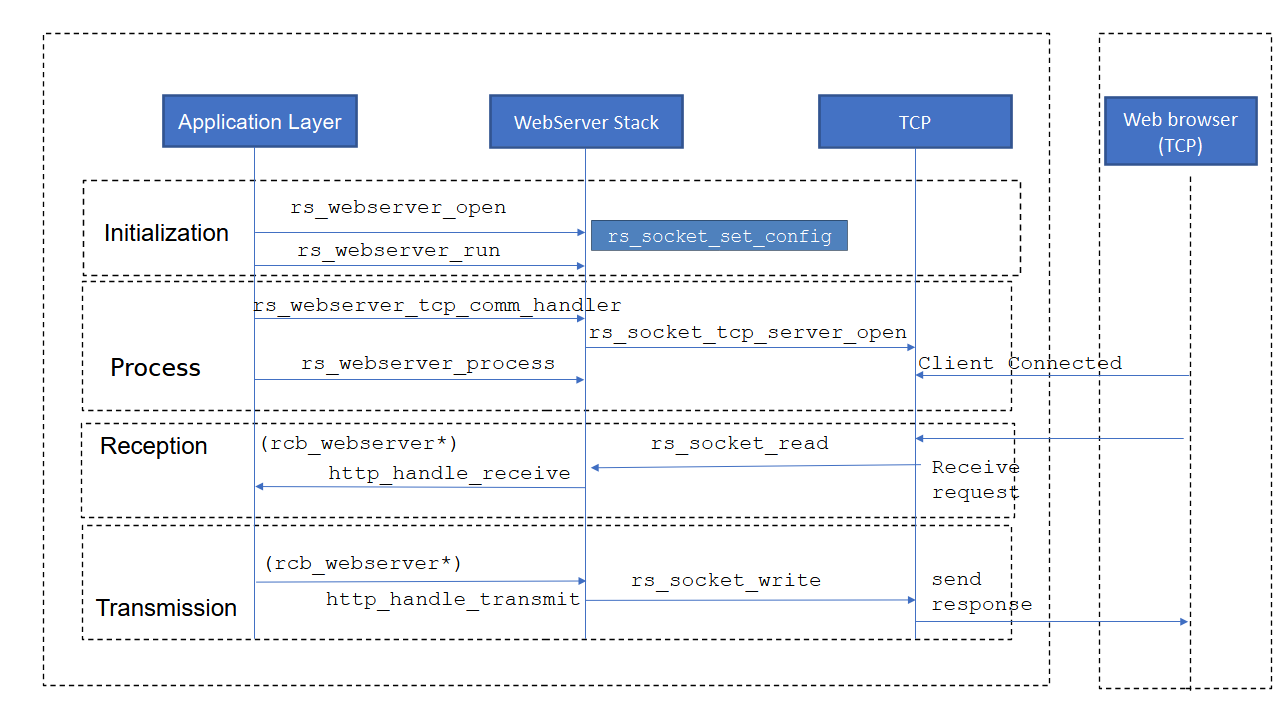
This section explains how to implement the Webserver stack using the RAPIDSEA stack, the steps to be followed are
Initially start the webserver task from the application layer.
Then the server task state is in idle condition, until webserver starts.
Webserver starts and changes its state from idle to open.
In webserver process, process the client request and prepare the response for the client.
The below diagram captures the high level sequence of operations associated with the webserver.
Error Code
Every API’s for the webserver returns some success or failure values. Please refer below section,
Dependency
This stack depends on the below RAPIDSEA interfaces that can be obtained or custom implemented.
Example demo
An example implementation is available along with the release and is described in Webserver Demo.
Webserver Header Details
Documentation from the relevant server header as follows:
Warning
doxygenfile: Cannot find file “rs_webserver.h